Speak. It’s on screen in 100ms — not 300.
Lips is the fastest dictation on your Mac, free for everyone. Every other voice app routes through the system clipboard — that tax is ~280ms. Callipso skips it and lands your words in the box you’re looking at, near-instantly.
Free forever. No account needed. macOS 13+ at launch — on-device, nothing leaves your Mac.
Used by those who move faster.
Every voice-to-text app on macOS delivers your words through the system clipboard. That takes ~280ms. Callipso skips it — a local WebSocket delivers your dictation to the focused text box in under 5ms. ~275ms saved per transcription, every time. Free for everyone, no account — the one-press auto-submit on top is the $3 contribution tier.
Learn anything as fast as the science allows.
The second thing Callipso gives away free: Sapio, a learning interface built on decades of memory research. Flashcards are the game inside it — spaced, retrieval-based, and tuned to your forgetting curve so you remember more in less time.
Spaced repetition, done right
An FSRS scheduler picks the exact moment a card is about to slip your memory and shows it then — the proven path to durable recall.
The most learned per minute
No busywork, no re-reading what you already know. Every review is the highest-value question the science says to ask next.
Learn anything
Languages, a codebase, medicine, music theory — bring any material. The method is what makes it fast, not the subject.
When you pay, you build the lab.
The tools are free because the point isn’t the tools — it’s the question of how people learn. Upgrade and you’re not buying a feature; you’re helping build an in-house learning-science lab, starting with its first hire. We publish where every dollar goes.
You join a study, not a customer list
Opt-in, anonymized usage becomes the sample for real research. You can see exactly what you contributed — N review sessions feeding Study #2.
Your $3 builds the lab
The Submit tier is a pass-through: 100% of net revenue goes toward building Sapio’s in-house learning-science lab, starting with the first hire — the science that makes the free tools work.
Receipts, in public
A live ledger tracks every dollar: funds raised, which studies, who runs them, and the results when they land. No receipts, no claim.
Write code? There’s a whole orchestrator under the hood.
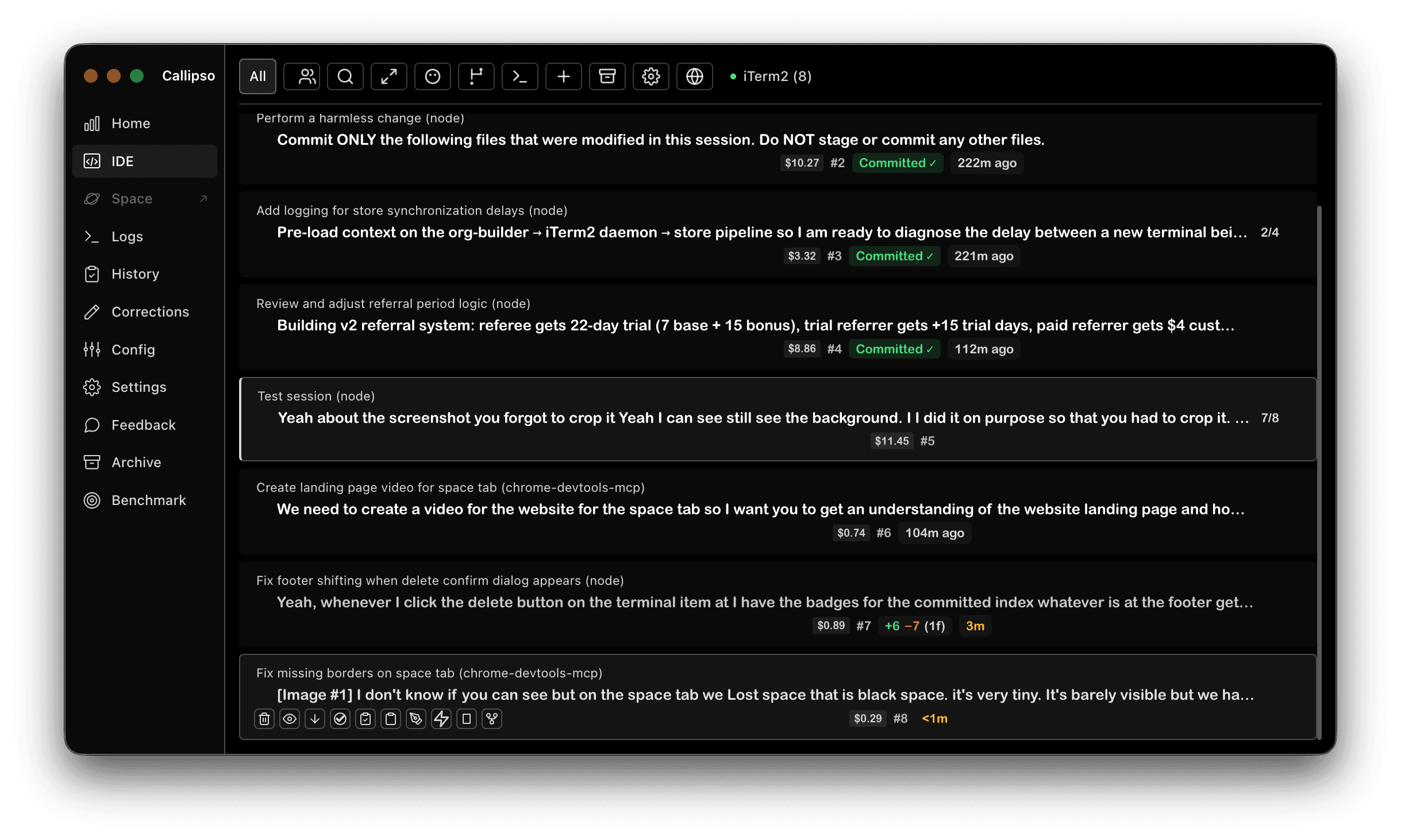
The same app that gives everyone fast dictation is, for developers, a transparent command center for AI coding agents across every terminal and IDE you already use. It’s the $8 tier — one flat price that keeps the whole thing being built.
Run any agent.
In any terminal.
No lock-in. Launch the agent you already use, in the terminal you already love — Callipso auto-detects the sessions and brings them into one command center.

Built for how you already work.
Ten features that stay out of your way until you need them, then do the work before you finish the sentence.
Per-session git diff
Click the diff badge on any terminal to see exactly what an agent wrote. Walks through every commit the session made — without leaving the overlay.
Token usage & cost
Live per-session, per-model cost breakdown on every terminal. Persists across restarts so you can tell which agent burned the budget yesterday.
Conflict detection
Callipso flags when two Claude Code sessions touch the same file before you commit. No more silent merge conflicts at the end of a parallel run.
Plan approval popup
Intercepts Claude Code plan mode. Review the plan, hit approve, send feedback, or dismiss — all from a focused popup that blocks the session until you decide.
Progressive transcription
Audio streams to the STT engine while you are still talking, so the tail is already transcribed by the time you stop. Perceived inference stays at ~100ms regardless of how long you talk.
Clipboard interleaving
Copy a code snippet mid-dictation and it lands exactly where you said it in the final prompt. Two modes: seamless inline, or with newlines around each paste.
Custom terminal buttons
Per-terminal footer buttons that echo inside the recording window. Fire preset prompts — “run tests”, “commit this”, “resume archive” — without stopping dictation.
Session archive
Every Claude Code session archived with SQLite FTS5 full-text search. Find any past prompt or response in milliseconds, resume from any point, cross-reference the exact git commits each session made.
20+ languages
Local NVIDIA Parakeet inference works in English, French, Spanish, German, Italian, Portuguese, Japanese, and 16 more. Zero cloud, zero data leaving your Mac.
Fleet mode
Control agents across multiple Macs from a single overlay. Distributed file locks, cost aggregation, peer discovery via mDNS.
Faster agentic
workflows
Use Callipso with Cursor, Claude Code, Codex, or any other agentic CLI — without leaving your editor. Talk to them by name, watch them work in 3D.
Focus-follows-voice
Callipso detects which terminal, IDE window, or browser text box is focused, then delivers your dictation there. Look at it, talk, it arrives. No window switching, no clipboard juggling.
Session-isolated routing
When multiple Claude Code sessions share the same Cursor window, Callipso uses the session_id from Claude’s hooks to route to the right one. Never the wrong session, never cross-pollinated.
Hotkeys if you prefer them
Prefer a keyboard-driven flow? F13–F16 map to terminals 1–4 and override focus detection. Both modes live side by side — use whichever fits the moment.
/init to create a CLAUDE.md@shape-generator.js can you add a nice morphing transition whengenerate? Like they morph from circle and vice versa orEdit file shape-generator.htmlWorks anywhere
you can type
10 terminal adapters. Universal paste to any app on your Mac. Say it, Callipso routes it.





Watch Your AI Agents
Navigate Your Codebase.
A real-time 3D visualization of every file read, write, and edit. Powered by Rust and WebGPU. Nothing else like it exists.
Real-Time Agent Activity
Every file Read, Write, Edit, and Search becomes an animated event. Ships fly to files, beams illuminate targets. You see exactly what Claude is doing, as it happens.
Rust + WebGPU Engine
Not Three.js. Not WebGL. A purpose-built Rust renderer compiled to WASM, running on WebGPU. Thousands of file nodes at 60fps.
Spatial Codebase Map
Files arranged in a 3D spiral hierarchy. Hot files glow brighter. Directories cluster together. Crossing minimization keeps the graph clean.
Multi-Session Awareness
Each Claude Code session is its own ship, color-coded by IDE. Run 5 agents in parallel and watch them all navigate your codebase simultaneously.
No one else does this.
Existing tools show code structure or agent activity. Never both. Never in 3D. Never in real-time.
| Feature | Callipso | CodeSee | Gource | Windsurf |
|---|---|---|---|---|
| 3D Rendering | Rust/WebGPU | 2D | OpenGL | 2D |
| Live AI Agent Activity | Yes | No | No | No |
| During Active Coding | Real-time | Static | Replay | On-demand |
| Codebase Hierarchy | Spiral 3D | 2D Map | Tree | Mermaid |
| Multi-Agent View | Yes | No | Devs only | No |
Callipso hasn’t launched — yet
The alpha lands in about two weeks. You can’t buy in just yet — but join the waitlist and we’ll email you the download the moment it’s live.
Pay what you want, from $3 — every dollar funds the lab
Free to use. Pay to build the learning-science lab.
Here’s the model at launch. The tools are free forever; the $3 tier funds building Sapio’s in-house learning-science lab, starting with our first hire. Join the waitlist for the download.
Pay what you want on Submit
The Submit tier is a donation surface, not a price tag. Floor is $3, the top is open, and the suggested amount is $5 — most supporters give above the floor. Every dollar buys the exact same feature; the difference is how much of the lab you fund. It all lands on the public ledger.
One honest note: card fees are a flat ~$0.30 + 2.9% per charge — about 13% at $3, under 10% at $5+. We keep $0 either way; giving a bit more just means more of it reaches the lab.
Free
Both free products, in full
- Lips — the fastest speech-to-text on macOS
- Sapio — the science-backed learning interface
- Voice send into the box you’re looking at
- No account, nothing leaves your Mac
Submit
Free, plus one-press auto-submit
Pay what you want — floor $3, suggested $5. 100% goes toward building Sapio’s in-house learning-science lab.
- Everything in Free
- Auto-submit — it presses Enter after sending
- You join as a founding supporter of the lab
- 100% of net revenue funds the first hire
Full
Submit + the developer orchestrator
- Everything in Submit
- Multi-terminal & IDE agent orchestration
- Macros, session archive, 3D Space, fleet
- One flat price — the complete app
Free tier needs no account. Cancel anytime. Prices in USD. Every paid dollar shows up on the public research ledger.
Double-sided invite
Invite a friend and you both get a month of Submit — and you both join the study. A referral adds a participant, not a discount.
You are a participant
Opt-in, anonymized usage becomes the research sample. See what you contributed — your review sessions feed real studies.
Public receipts
A live ledger shows funds raised, which studies, who runs them, and results. Money in, science out — in the open.
Questions
What is Callipso?
Callipso is a transparent agent orchestrator for macOS. It discovers AI coding agents across 10 platforms you already use — Cursor, VS Code, Windsurf, Antigravity, iTerm2, Ghostty, Terminal.app, Kitty, tmux, and cmux — and delivers your dictated voice to whichever terminal you are looking at, without asking you to move your workflow into a new environment.
How does voice routing actually work?
Callipso detects the focused terminal, IDE window, or browser text box and routes your dictation there automatically. Look at a Cursor terminal and talk — the text lands there. Switch focus to a Ghostty window and talk — the text lands there instead. No magic word, no memorized shortcuts. F13–F16 hotkeys are also available if you prefer a keyboard-driven flow.
Why is it faster than other voice-to-text apps?
Every other voice app on macOS delivers text via the system clipboard + simulated Cmd+V paste, which costs roughly 280ms per transcription (measured median, n=10 trials). Callipso skips it entirely: a local WebSocket delivers your dictation straight into the focused text box in under 5ms and auto-submits the prompt. That is ~275ms saved per transcription, every time.
What speech-to-text engine does Callipso use?
The built-in engine is NVIDIA Parakeet running locally on your Neural Engine via CoreML — no cloud, no API key, no data leaving your Mac. 20+ languages. Average inference is around 100ms. If you prefer a different STT, Callipso also works with any tool that writes to the clipboard: Whisper.cpp, macOS Dictation, SuperWhisper, Wispr Flow.
Does Callipso work with Claude Code?
Yes — Claude Code is the deepest integration. Callipso reads Claude Code’s hook events (prompt-start, stop, PostToolUse, PermissionRequest) to track session IDs, task state, token usage, per-session git diffs, and plan-mode approval popups. Session IDs are used to route voice to the exact right session even when multiple Claude sessions share the same Cursor window.
Does Anthropic’s June 15, 2026 Agent SDK change affect Callipso?
No. That change moves the Claude Agent SDK and the claude -p CLI command onto a separate monthly credit. Callipso uses neither — it drives the genuine interactive claude UI by delivering text into it and reads Claude Code hook events. It is never in the inference request path, so your subscription limits work with Callipso on June 15 exactly as they do today.
Is using Callipso considered programmatic Claude usage?
No. Anthropic’s line is about what makes the request to its servers. Tools built on the Agent SDK or claude -p put their own code in that path, which counts as programmatic. Callipso sits between you and the keyboard — it automates input to the genuine, unmodified claude UI and observes output via hooks. That is interactive use, which Anthropic left unchanged.
Can I use multiple IDEs and terminals at once?
Yes. Callipso discovers terminals across all 10 adapters simultaneously and assigns every terminal a global index. You can run Cursor for the frontend, Ghostty for infrastructure scripts, and iTerm2 for debugging side by side — Callipso sees all three and routes voice to whichever one has your focus.
What is the Space visualizer?
A real-time 3D view of your codebase where AI coding agents appear as ships navigating between files. Built in Rust, compiled to WebAssembly, rendered via WebGPU. When an agent reads a file, its ship moves toward the node; when it writes, the node pulses. It is an optional flagship feature and genuinely useful for watching parallel agents work.
What happens if two agents edit the same file?
Callipso’s conflict detection flags when two Claude Code sessions touch the same file before you commit. The diff badge on the terminal item turns into a yellow warning triangle. You can open the session diff viewer to see exactly what each session changed and decide how to merge.
What about Windows and Linux?
Currently macOS only. The terminal adapters lean heavily on macOS-specific APIs — Accessibility, NSWorkspace, AppleScript, and CoreML — which do not port cleanly. Windows and Linux are on the roadmap but not the near-term roadmap.
Is the source code available?
The Callipso Electron app source is in a private repository. The IDE extension, the Chrome / Firefox browser extensions, and the callipso.dev website are open source on GitHub.
Can I cancel my Callipso subscription anytime?
Yes. Cancel from your account settings at any time. Your Pro access continues until the end of your current billing period. No prorated charges, no penalties.
What's the refund policy?
14-day money-back guarantee on all paid plans, no questions asked.
Can I use my license on multiple machines?
Yes. One license, unlimited personal machines. The license is tied to your account, not a specific device. Up to 8 concurrent devices via the heartbeat session system.
Does Callipso record or store my voice?
No. Callipso never touches your audio. The built-in Parakeet engine runs entirely on your Neural Engine and the transcribed text is delivered directly to the focused text box — nothing is uploaded, nothing is stored on disk. If you use a third-party STT, Callipso reads the transcribed text from the clipboard after your tool has already handled the audio.
What data does Callipso collect?
Anonymous usage analytics via PostHog — opt-out anytime in Settings. We never collect clipboard contents, terminal output, prompts, responses, or code. You can export or delete all your data from Settings.
Take command of your agents
Downloads are gated while we finish the public launch. Drop your email and we’ll let you know the moment it’s ready.